Creative teams often need to combine several references, preserve a subject or product, and update text without rebuilding an image from scratch. Qwen-Image-Edit-Plus, also released as Qwen-Image-Edit-2509, brings those tasks into one prompt-based workflow.
Built on Qwen-Image, this 20B MMDiT model is designed for marketers, designers, e-commerce teams, and creators who need more control over multi-image composition and localized edits.
Why Qwen-Image-Edit-Plus
Image generation is useful for exploration, but production work depends on repeatability: the right person, product, layout, and text must survive each revision. Qwen-Image-Edit-Plus focuses on controlled, high-fidelity editing so teams can iterate without losing the elements that already work.
Key benefits
- More precise revisions: Make a targeted adjustment or a broader transformation while keeping the prompt focused on the intended change.
- Bilingual text editing: Modify Chinese and English copy, along with font, color, and material attributes.
- Stronger consistency: Preserve recognizable people and products across new poses, styles, scenes, and campaign assets.
Core capabilities
- Multi-image editing: Combine references such as person + person, person + product, or person + scene. For best results, use one to three input images.
- Person consistency: Preserve facial identity across portrait styles and pose transformations.
- Product consistency: Retain product identity while creating posters, placements, and campaign variations.
- Text consistency: Change copy as well as font, color, and material while retaining the surrounding design.
Choose the right editing mode
A key innovation of this model is its dual approach to image editing.
-
Appearance-Level Editing: This is for surgical, low-level changes. Think of it as inpainting on a professional level. The goal is to make a specific change while keeping all other regions of the image absolutely untouched. This is ideal for tasks like removing an object, adding a new element, or correcting a flaw.
-
Semantic-Level Editing: This is for high-level, creative transformations. The model is allowed to make broader pixel changes across the image as long as it preserves the core meaning and content. This is perfect for style transfer, object rotation, or IP creation where the final output is stylistically different but semantically consistent with the original.
How the multi-image workflow works
The beauty of Qwen-Image-Edit-Plus lies in its intuitive, prompt-based interface. Here are some examples of what you can do and the prompts you would use.
Example: Compose an image from three references
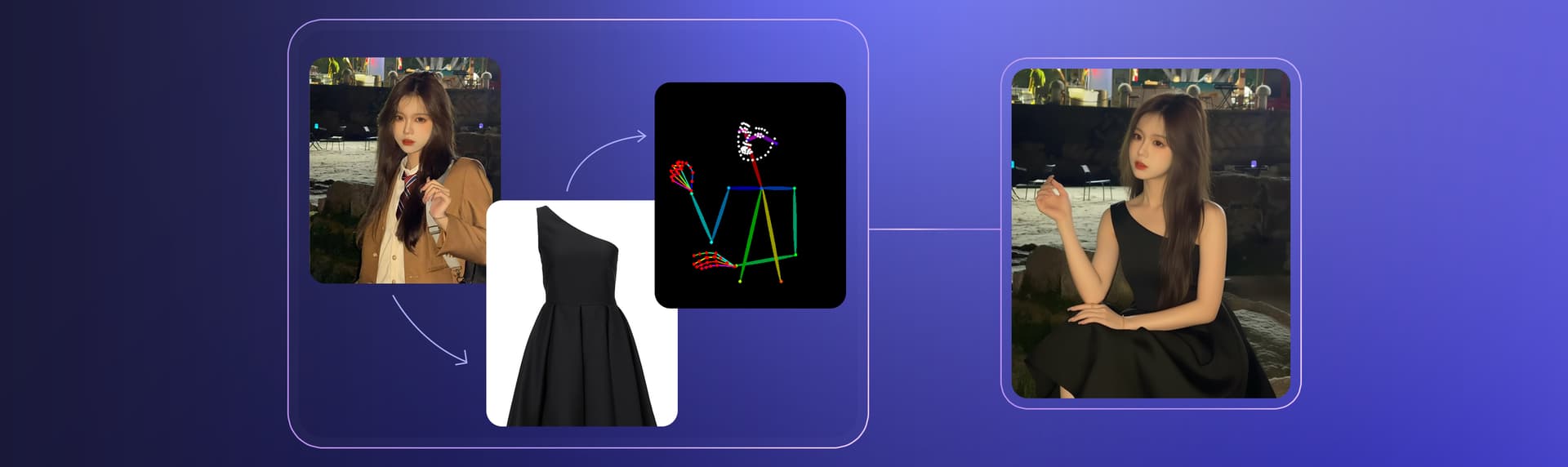
Goal: Create a fashion image that combines a person, a dress, and a pose from three separate references.
- Upload the reference images:
- Image 1: A portrait of a girl.
- Image 2: A photo of a black dress.
- Image 3: An image of a model striking a specific pose.
- Describe how to combine them:
In the style of a fashion photo, create an image of the girl from Image 1, wearing the black dress from Image 2, and in the pose from Image 3.
Start with a focused edit
Start with one clear goal and one to three strong reference images. Specify which elements should change, which should remain unchanged, and the visual result you need. Once the composition is correct, refine text, color, lighting, or materials in separate passes.